Recruiters spend a large part of the hiring process in conversations. Intake calls, candidate interviews, panel discussions, hiring-manager debriefs, and offer conversations all contain details that may affect what happens next.
The problem is that those details are often spread across handwritten notes, memory, chat messages, and different team members' personal documents. An AI meeting recorder can help create a more consistent record of those conversations by capturing meetings, producing transcripts, and organizing information for later review.
Used well, this technology does not replace recruiter judgment. It reduces the administrative work around interviews so recruiters can stay focused on the conversation itself.
Why Interview Notes Are Harder Than They Look
Taking useful interview notes involves doing several things at once.
A recruiter may need to:
- listen carefully to the candidate;
- ask follow-up questions;
- watch the clock;
- compare answers with the role requirements;
- record important details;
- note questions for the hiring manager;
- prepare a summary afterward.
Trying to type everything in real time can make the interview feel less natural.
Relying entirely on memory creates the opposite problem. Important details may disappear between back-to-back interviews, especially when a recruiter is managing several vacancies at once.
A recording and transcript provide another layer of documentation that can be reviewed after the call.
What Does an AI Meeting Recorder Do in Recruitment?
An AI meeting recorder captures an online conversation and turns it into material that can be searched and reviewed later.
Depending on the platform, this may include:
- meeting recording;
- automatic transcription;
- speaker identification;
- structured notes;
- meeting summaries;
- decisions and next steps.
For recruitment teams, the most useful outcome is usually not the recording itself.
It is having a reliable starting point for the documentation that follows.
Instead of reconstructing a 45-minute interview from memory, a recruiter can review the transcript, verify important statements, and prepare the hiring record from the original conversation.
Use Case 1: Candidate Interviews
Candidate interviews are the most obvious use case.
During a live interview, the recruiter should ideally be able to focus on the person rather than on producing perfect notes.
An AI recorder can capture the conversation while the recruiter concentrates on asking questions and listening to the answers.
Afterward, the transcript can help the recruiter check:
- what experience the candidate described;
- which examples they gave;
- questions that need clarification;
- availability or logistical details;
- agreed next steps.
This does not mean every word should automatically become part of the candidate record.
Recruiters still need to decide which information is relevant, appropriate, and necessary for the hiring process.
Use Case 2: Recruiter and Hiring Manager Intake Calls
Candidate conversations are only one part of recruitment.
A poorly documented intake meeting can create problems before sourcing even begins.
Hiring managers may discuss:
- responsibilities;
- required skills;
- preferred experience;
- team structure;
- interview stages;
- priorities;
- deal-breakers;
- timing.
If those details remain in someone's memory, the recruiting team may leave the meeting with different interpretations of the same role.
Recording and transcribing the intake call creates a source that recruiters can revisit when building the job brief or preparing interview questions.
It also makes it easier to identify where the hiring team itself has not yet reached agreement.
Use Case 3: Panel Interviews
Panel interviews create a different documentation problem.
Several interviewers may ask questions, take notes in different formats, and leave with different impressions.
Speaker identification becomes particularly useful here because it helps distinguish who asked a question and who gave a particular response.
A transcript can also reduce the temptation to rely on whichever panel member took the most detailed notes.
The hiring decision should still come from the agreed evaluation process, not from the transcription software. The transcript simply gives the team a more complete record to consult.
Use Case 4: Interview Debriefs
Some of the most important hiring information appears after the candidate leaves the call.
Recruiters and hiring managers may discuss strengths, concerns, follow-up questions, and whether the candidate should move to the next stage.
Those debriefs are easy to lose because they often happen quickly between meetings.
An AI note taker can help capture:
Decision: What did the team agree?
Open questions: What still needs to be verified?
Next step: Who needs to do what?
That turns the debrief into a clearer handoff rather than another conversation that someone has to summarize from memory.
Why Transcripts Are More Useful When They Are Searchable
A transcript becomes more valuable once recruiters can find information without replaying an entire recording.
For example, someone reviewing an interview later might search for:
- notice period;
- salary expectations;
- management experience;
- specific software;
- relocation;
- a particular project or employer.
This is where meeting transcription software can be more practical than a simple audio recording.
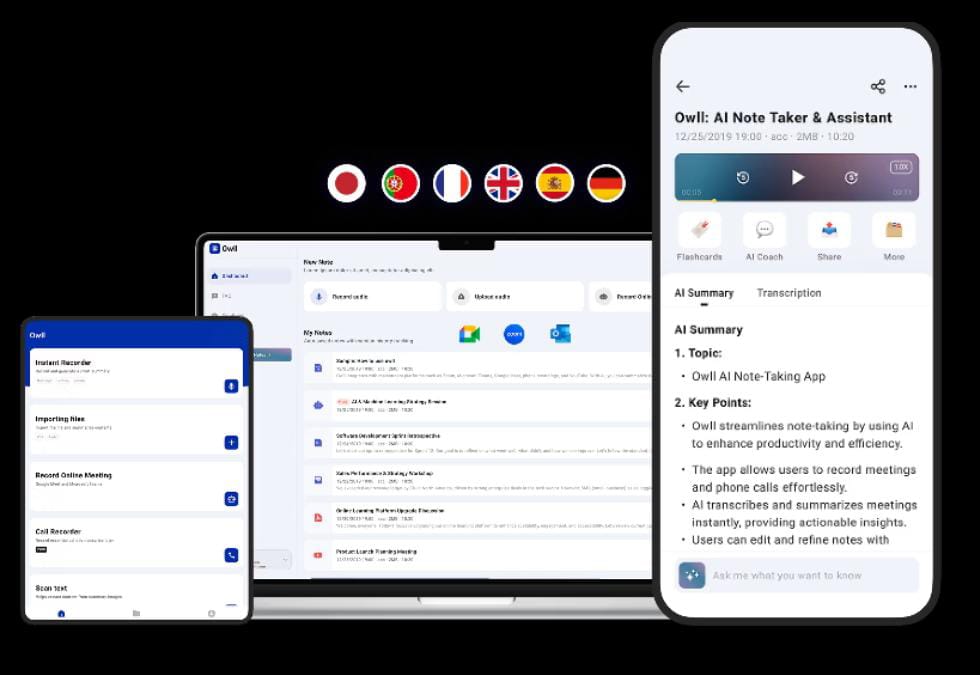
Owll converts meeting and uploaded audio into searchable text and is designed to support conversations from platforms such as Zoom, Microsoft Teams, and Google Meet.
The recruiter still needs to verify important details against the original conversation, especially when names, technical terminology, accents, overlapping speech, or poor audio quality are involved.
AI Notes Should Support Evaluation, Not Become the Evaluation
There is an important distinction between documenting an interview and judging a candidate.
An AI meeting recorder can help capture what was said.
That does not mean the software should determine whether the person is suitable for the role.
Recruitment decisions involve context that a transcript alone cannot provide. Teams may need to assess:
- evidence against agreed criteria;
- relevant experience;
- technical capability;
- communication;
- job requirements;
- references;
- other structured assessments.
Automatically generated notes are therefore most useful as supporting documentation.
The recruiter remains responsible for interpreting the evidence and following the organization's hiring process.
Build a Consistent Interview Documentation Workflow
Simply buying an AI note-taking tool does not automatically create better hiring records.
Teams still need a consistent process.
A practical workflow might look like:
Before the Interview
Confirm which meetings should be recorded and make sure the required notice, consent, or permission process has been followed.
Prepare the structured interview questions and evaluation criteria.
During the Interview
Focus on the candidate and the conversation.
The meeting recorder captures the call while the recruiter adds only the notes that require immediate attention.
Immediately After
Review the generated transcript and summary.
Correct names, terminology, and important factual details where necessary.
Create the Hiring Record
Transfer only relevant information into the organization's recruitment system or agreed documentation.
Avoid storing unnecessary conversational details simply because they appear in the transcript.
Complete the Handoff
Record decisions, open questions, and next steps so the next interviewer or hiring manager knows what needs attention.
Recording Requires Transparency
Recruitment conversations can contain personal information.
Teams should therefore decide how recording fits into their privacy, retention, and candidate-communication policies before introducing AI meeting tools.
Candidates should not discover after the interview that the conversation was recorded.
Recruitment teams should understand:
- when recording is permitted;
- what notice or consent is required;
- who can access recordings and transcripts;
- how long the information is retained;
- when it should be deleted;
- which information belongs in the formal candidate record.
Requirements vary by jurisdiction and organization, so legal and privacy teams may need to define the appropriate process.
Technology should fit the hiring policy, not the other way around.
Where Transcription Can Still Go Wrong
AI transcription is useful, but it is not infallible.
Common difficulties include:
Accents and Speech Patterns
Different accents, speaking speeds, and pronunciation can affect transcription quality.
Overlapping Speakers
Panel discussions are harder to transcribe when several people speak at once.
Specialist Vocabulary
Technical roles often involve product names, programming languages, abbreviations, certifications, or industry terminology that may be transcribed incorrectly.
Poor Audio
Weak microphones, background noise, unstable connections, and meeting-room acoustics can all affect the transcript.
Important hiring information should therefore be checked rather than copied into the candidate record without review.
What Should Recruiters Look for in an AI Meeting Recorder?
The right tool depends on the recruitment workflow, but several practical questions are worth asking.
Does It Work With Your Meeting Platforms?
Recruitment teams commonly use Zoom, Microsoft Teams, or Google Meet.
A recording tool should fit the systems already used for interviews.
Does It Identify Speakers?
Knowing who said what becomes increasingly important in panel interviews and hiring-manager calls.
Can You Search the Transcript?
Search makes long interviews significantly easier to review later.
Does It Produce Structured Summaries?
A useful summary should help recruiters find decisions and next steps without pretending to replace the original interview.
Can You Review the Original Conversation?
Recruiters need a way to verify important information when the transcript is unclear.
Does It Fit Your Privacy Process?
Access controls, recording policies, retention, and candidate communication should be considered before rollout.
AI Meeting Tools Are Most Valuable Between Interviews
The most visible feature of an AI meeting recorder is recording the call.
But for recruitment teams, much of the value appears afterward.
A usable interview record can make it easier to:
- prepare candidate summaries;
- hand off between recruiters;
- brief hiring managers;
- revisit an answer before the next stage;
- capture agreed next steps;
- reduce dependence on memory.
This is particularly useful for distributed recruitment teams where several people may be involved in the same hiring process across different locations or time zones.
FAQ
Can recruiters use an AI meeting recorder for interviews?
Yes, where recording is permitted and the organization follows the appropriate privacy, notice, and consent requirements. The recording should support interview documentation rather than replace recruiter judgment.
Is an AI note taker the same as interview assessment software?
No. An AI note taker primarily captures and organizes the conversation. Candidate assessment tools may score or evaluate applicants against specific criteria. Those are different functions and should not be treated as interchangeable.
Should recruiters trust AI-generated interview summaries without checking them?
No. Important details should be reviewed against the transcript or recording, especially names, numbers, specialist terminology, and statements that may affect a hiring decision.
What meetings can recruitment teams record?
Potential use cases include candidate interviews, hiring-manager intake calls, panel interviews, and recruitment debriefs, subject to the organization's recording and privacy policies.
Final Thoughts
Recruitment still depends on human conversation and human judgment.
AI meeting technology is most useful when it helps preserve those conversations without forcing recruiters to spend the entire interview typing notes.
A good workflow captures the meeting, creates a searchable record, supports a structured summary, and leaves the hiring decision with the people responsible for making it.
For recruitment teams managing more interviews across more roles and locations, that can turn meeting documentation from an inconsistent administrative task into a more reliable part of the hiring process.